In-House vs Outsourced AI Video: How to Decide
In-house vs outsourced AI video compared by generative AI cost, staff time, revisions and review responsibility, using records from a 76-second sample.
Whether to make AI videos in-house or hire a production company depends less on generative AI fees than on whether your team can cover the working time and the responsibility for checking the video until it is finished. Generative AI fees may look cheap, but planning, generating, selecting, editing and revising all take people's time.
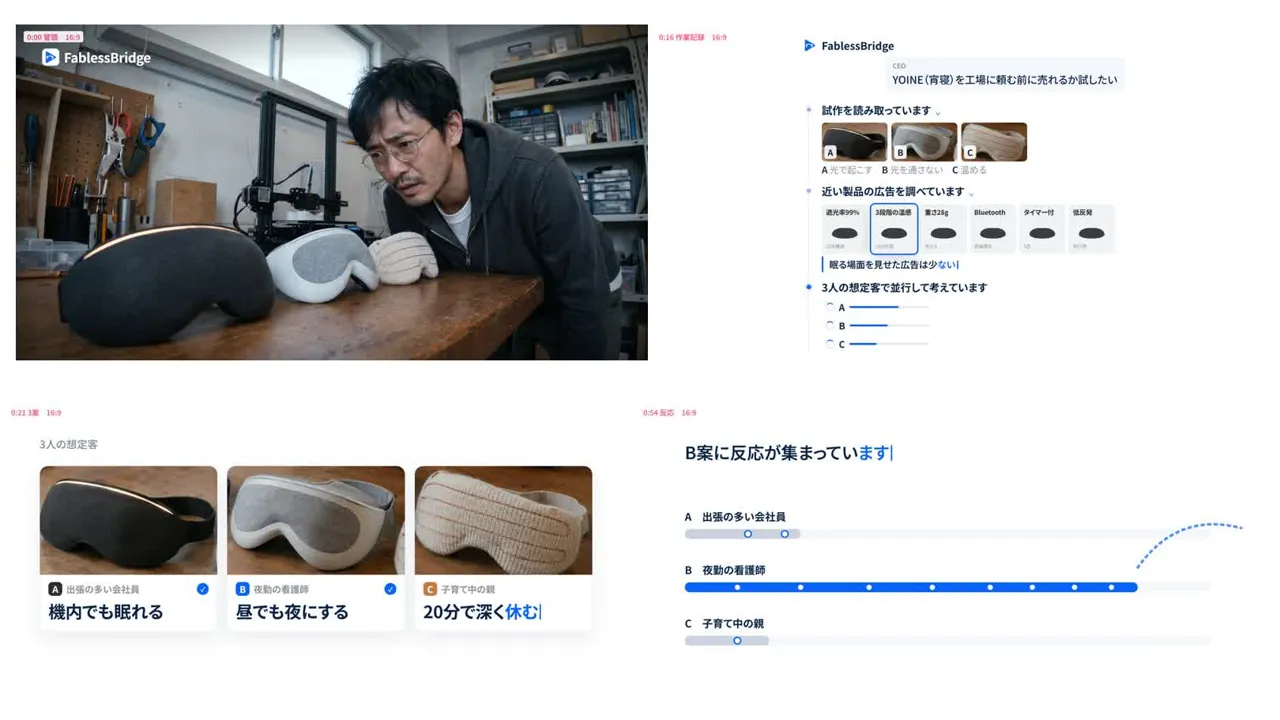
When FablessBridge made Yoine, a 76-second in-house sample, the estimated generative AI cost was about $23. At the same time, the work ran from around 1 a.m. to around 2 p.m. the same day, with a break for sleep, and the video went through seven versions. This article uses that record to lay out, item by item, what changes between in-house and outsourced production.
Four things that differ between in-house and outsourced AI video
- 01Cost: in-house means generative AI fees plus staff time; outsourcing means the production fee
- 02Who does the work: in-house means your own staff; outsourcing means the production company
- 03Revisions: in-house allows unlimited revisions but they take time; outsourcing covers revisions within the contract
- 04Review responsibility: either way, the ordering company owns the final check before publishing
Separate generative AI fees from people's working time
For Yoine we generated 68 images, 37 videos, 3 music tracks and 6 kinds of sound effects, and the estimated generative AI cost was about $23. Looking at that number alone, in-house production seems far cheaper.
That cost does not include the time spent writing the script, choosing shots from the candidates, creating on-screen text, syncing sound, or watching the whole video and fixing it. With Yoine we rendered seven versions to finish one video, repeating feedback and revisions. If you produce in-house, first consider whether the person in charge can free up this time from other work.
Most generative AI tools are paid, and every generation costs money. Producing in-house also makes contracts and payments for each service, checking terms of use, and managing API keys your team's job.
Work and decisions needed when producing in-house
An AI video is not finished with a single tool. For Yoine we combined the following tasks.
- 01Decide who the video is for and what it shows, and turn it into a script with timestamps
- 02Settle the look of people and products with an image generation AI
- 03Animate with a video generation AI, and check each clip for distorted faces, hands and on-screen text
- 04Build text and screens accurately in HTML or similar
- 05Create music and sound effects and sync them to the footage
- 06Watch the whole video, give feedback, and revise across versions
Some hands-on work can be delegated to an AI coding assistant, but a person has to watch and listen to judge which shots to use, what looks unnatural and whether the sound fits. Having someone on staff who can keep making these judgments is the most important condition for choosing in-house production.
What is fixed in advance when you hire a production company
When you outsource, the price, revisions and delivery time are set up front. FablessBridge's basic plan is as follows (as of October 2026).
- Price
- $1,000 (excl. tax) per 60–90 second video
- Orientation
- Landscape (16:9) or portrait (9:16)
- Major revision
- Up to 1
- Delivery
- As few as 5 business days from the briefing
The price covers everything from the script and storyboard to footage, narration and music, and no filming is needed. What you prepare is materials and photos of your product or service, plus time to review the script, storyboard and finished video. A 15-second video is $500 and a 30-second video is $700 and delivering in both landscape and portrait formats adds $100 per video. Videos over 90 seconds, landing page production, and ad placement and management are quoted separately.
What the price covers is explained in "AI video production cost", and what to check when comparing production companies is covered in "How to choose an AI video production company".
Revisions and pre-publication checks stay with your company either way
In-house, there is no limit on revisions, but every fix costs staff time and generative AI fees. With outsourcing, the scope of revisions is set by contract. At FablessBridge, one revision that turns the video into something entirely different, such as changing the structure, is included in the price as a "major revision" (as of October 2026).
Whichever you choose, the responsibility for checking the content before publishing stays with the ordering company. Your staff or legal team checks that product descriptions and wording are correct, that no faces or voices resemble real people, and that the video complies with the terms of the generative AI used. FablessBridge also asks clients to have their legal team review the video before publishing, since it contains AI-generated material.
Guidelines for deciding between in-house and outsourced AI video
In-house production suits cases like these.
- 01Someone on staff can handle everything from planning through feedback continuously
- 02You make short videos often and want to test them while making small fixes
- 03You have room before the publishing deadline and want to keep the know-how in the company
Outsourcing suits cases like these.
- 01The person in charge has other duties and cannot spare time for production
- 02The publishing date is fixed and you want to lock in delivery time and price first
- 03It is your first video and you want advice on structure and presentation
Another option is to outsource the first video to learn the process and what to check, then make shorter variations in-house afterward. Decide how much to handle internally based on how many videos you want and how much time your staff has.
Talk to us about your video
You don’t need a finished plan to get in touch.
ContactSee pricing and the production process